
Deno 1.46: The Last 1.x Release


Deno’s goal is to level up how people write JavaScript, by offering native TypeScript support, an all-in-one toolchain, web standard API support, and secure by default code execution
Deno 1.46 (our final 1.x release) continues to forge towards this vision, by
simplifying the CLI with
shorter invocations and
short-hand permission flags, enabling
multi-threaded web servers with deno serve --parallel,
and adding numerous
Node.js/npm compatibility improvements
(featuring support for playwright, @google-cloud, mysql2, pglite,
ssh2, and much more).
In addition to those standout updates, 1.46 comes with
better dependency management with deno remove and
deno clean, code signing for deno compile
for improved software portability, and newly added
support for HTML, CSS, YAML, and more in deno fmt.
To upgrade to Deno 1.46, run the following in your terminal:
deno upgradeIf Deno is not yet installed, run one of the following commands to install or learn how to install it here.
# Using Shell (macOS and Linux):
curl -fsSL https://deno.land/install.sh | sh

# Using PowerShell (Windows):
iwr https://deno.land/install.ps1 -useb | iex
What’s New in Deno 1.46
- Simpler CLI
- Faster
deno serve deno fmtnow supports HTML, CSS, YAML, and more- Dependency management
- Code signing for
deno compile deno upgraderevamp- Node.js and npm compatibility
- Performance improvements
- Testing and coverage improvements
- Simpler frozen lockfile
- File watcher
- Two new Web APIs
- The Standard Library is stable
- V8 12.9
- Acknowledgments
- What’s next?
Simpler CLI
This release brings a big refresh to deno CLI.
Shorter invocations
This release brings a long requested and awaited change to how you run Deno programs.
deno and deno run were changed to provide a more ergonomic way of doing
common tasks.
You can now run program with just deno, not having to specify run
subcommand:
# Deno v1.45
deno run hello.ts
Hello world 🦕

# Deno v1.46
deno hello.ts
Hello world 🦕
You can still pass all necessary flags to deno subcommand
# Deno v1.45
deno run --allow-read main.ts
Reading ./log.txt...

# Deno v1.46
deno --allow-read hello.ts
Reading ./log.txt...
Another ergonomic change is an ability to run tasks using deno run:
// deno.json
{
  "tasks": {
    "test": "deno test --allow-read --allow-net"
  }
}
# Deno v1.45
deno task test
# Deno v1.46
deno run testThis might be a small change, but the muscle memory is real! For users with
years of experience running tasks using npm run <script> this should be a
game-changer.
⚠️ Pre-v1.45 behavior is still supported. You can still use
deno taskanddeno runas in previous versions. These changes are geared towards users familiar with other scripting environments that default to executing the first argument as a script.
Short-hand permission flags
Deno’s permission system is one of the most important features Deno ships with.
The --allow-* and --deny-* flags are useful for limiting access to parts of
your system. Due to their verbosity a lot of users opted to use the
--allow-all flag, or more precisely its shorthand -A.
In Deno v1.46 you can now enjoy one-letter variants of most commonly used permission flags:
| Long | Short |
|---|---|
--allow-read |
-R |
--allow-write |
-W |
--allow-env |
-E |
--allow-net |
-N |
--allow-sys |
-S |
These shorthand flags accept allow lists just like the long versions - eg.
-R=./static, -E=DEBUG,LOG, -N=deno.com.
If you don’t want to provide allow lists you can combine them together - eg.
-RWN will enable read, write and net permissions.
Here’s a couple examples how you can shorten your CLI invocations:
# Deno v1.45
deno run --allow-read=./static --allow-env --allow-net=myapi.example.com main.ts

# Deno v1.46
deno run -R=./static -E -N=myapi.example.com main.ts

# Deno v1.46 without `run` subcommand
deno -R=./static -E -N=myapi.example.com main.ts
# Deno v1.45
deno run --allow-read --allow-write --allow-env --allow-sys main.ts
# Deno v1.46
deno run -RWES main.ts
# Deno v1.46 without `run` subcommand
deno -RWES main.tsNew help output
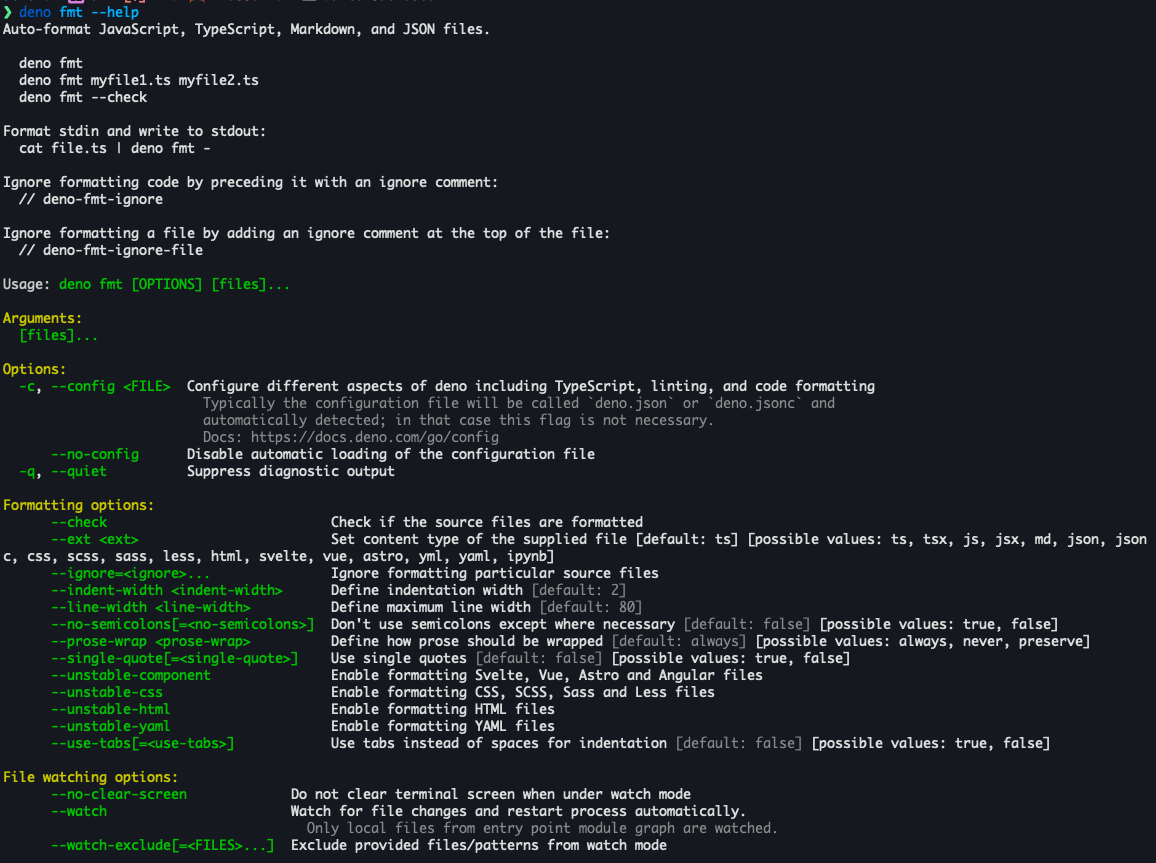
CLI option flags are now logically grouped into categories
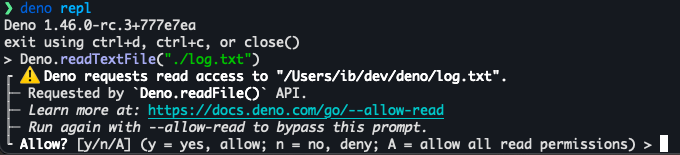
Permission prompts link to docs
Permission prompts now link to docs for relevant permission flags
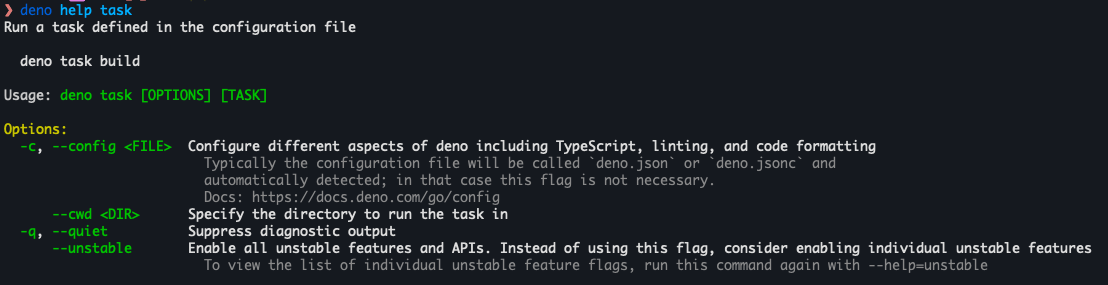
deno help <subcommand>
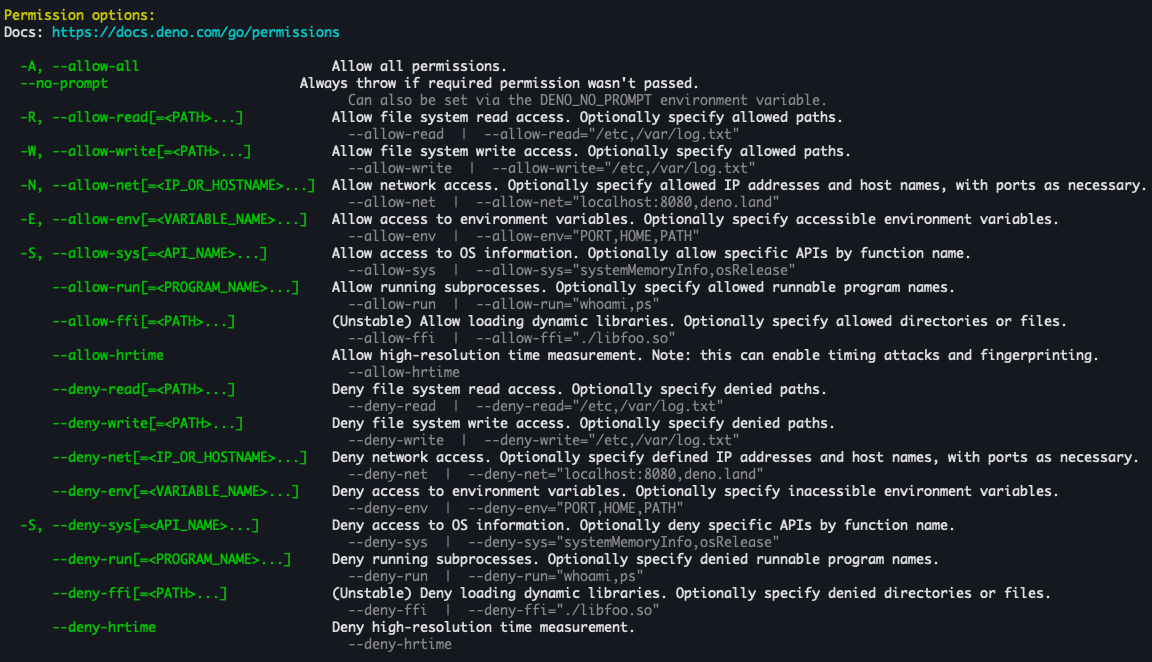
--allow-* flags help output
Help text for permission flags was refreshed, including example usage.
--env renamed to --env-file
--env flag provides a “dotenv” functionality, that reads env vars from a
specified file and sets them for the process before JavaScript code is executed.
It’s super handy and all popular JS runtimes ship with this functionality. To
align with other runtimes and make it easier to migrate from, the --env flag
has been renamed to --env-file. The old flag will keep working, but will not
be shown in the help output.
New progress bar
A bit of the feedback that was coming up every so often was that Deno sometimes appears to be stuck downloading dependencies. In reality the problems were various - poor internet connectivity, rate limiting by the package registry and more. That said, lack of interactive indication that Deno is doing some work didn’t help users eager to start hacking.
To make it unambiguous that Deno is still working, we’ve refresh the progress bar to provide more interactivity
Glob support for deno check and deno cache arg
Deno v1.34 added support for globs in config file and CLI flags.
This globbing functionality had been since expanded to most of the Deno
subcommands and today you can enjoy glob expansion in the deno check and
deno cache subcommands.
⚠️ Make sure to put the glob in quotes. Otherwise your shell will expand it instead of Deno, which might lead to subtle bugs because of glob implementations discrepancies.
# Type-check all `.ts` files in the current directory and its descendants
deno check "*/**/*.ts"

# Cache all JS files in the current directory
deno cache "*.js"
Faster deno serve
deno serve was introduced in Deno v1.43
and received a lot of positive feedback. This release brings a few highly
desired changes to deno serve.
1. Develop
With the addition of deno init --serve option, you can kick-start a server in
10 seconds.
Example project includes routing using
@std/http and a file server integrated
for efficient static asset serving.
$ deno init --serve
$ deno serve -R main.ts
Listening on http://localhost:8000
$ curl http://localhost:8000/hello
This subcommand is meant to be a quick prototyping tool that you can scale up as your project grows and is not meant to replace frameworks like Fresh.
2. Type-check
One of the limitations of deno serve has been its complex setup to properly
type-check the entrypoint file. With Deno v1.46 and latest TypeScript features
this is now easy: just add satisfies Deno.ServeDefaultExport to the
default export of the entrypoint file:
// server.ts
export default {
  fetch(req) {
    console.log(req.RequestDoesntHaveThisPropery);
    return new Response("Hello world!");
  },
} satisfies Deno.ServeDefaultExport;
If you type-check this file, Deno will warn about any API compatibilities:
$ deno check server.ts
Check file:///dev/server.ts
error: TS2339 [ERROR]: Property 'RequestDoesntHaveThisPropery' does not exist on type 'Request'.
    console.log(req.RequestDoesntHaveThisPropery);
                    ~~~~~~~~~~~~~~~~~~~~~~~~~~~~
    at file:///dev/server.ts:3:21
Note that deno init --serve will automatically add
satisfies Deno.ServeDefaultExport to your deno serve entrypoints when you
scaffold new server projects.
3. Scale
The Deno.serve() API that
powers the deno serve subcommand is plenty fast. But it only uses a single
thread by default. This makes sense since JavaScript is a single-threaded
language, provided you don’t use APIs like new Worker(). But modern servers
have multiple cores that should be leveraged for the most efficient use of
resources.
To help you achieve top performance given available resources, deno serve now
supports a --parallel flag that let’s you run your server on multiple threads
by leveraging multiple cores of the CPU:
$ deno serve --parallel main.ts
deno serve: Listening on http://0.0.0.0:8000 with 10 threads
You can specify how many threads you want to use by using the DENO_JOBS
enviornment variable. If you do not specify this variable, it will default to as
many threads as your machine provides. To limit the number of threads to 4 for
example, you can run:
$ DENO_JOBS=4 deno serve --parallel main.ts
deno serve: Listening on Listening on http://0.0.0.0:8000 with 4 threads
There’s no magic here - Deno just run X copies of the same server, keeping each thread a single-threaded JavaScript runtime. This makes reasoning about the state of your app much simpler as scaling locally behaves just as scaling in the cloud.
Learn more about how this feature works in
this Deno talk about parallelizing deno serve.
deno fmt now supports HTML, CSS, YAML, and more
This release brings a major upgrade to Deno’s built-in formatter
deno fmt.
deno fmt can now be used to format HTML, CSS, SCSS, Sass, Less, YAML, Astro,
Angular, Svelte and Vue files.
Let’s format this HTML file:
// index.html
<!DOCTYPE html>
<html lang="en">
<head>
            <meta charset="UTF-8">
 <title>Hello `deno fmt`</title>
</head>
<body>
      <h1>Hello <pre>
          deno fmt!
      </pre></h1>
    </body></html>
$ deno fmt --unstable-html index.html
$ cat index.html
<!DOCTYPE html>
<html lang="en">
<head>
<meta charset="UTF-8" />
<title>Hello `deno fmt`</title>
</head>
<body>
<h1>Hello <pre>
deno fmt!
</pre></h1>
</body>
</html>Since this is a major change to deno fmt, formatting in these new formats is
currently unstable. In order to enable these new formats in deno fmt, it’s
required to pass an --unstable-* flag or add an option in deno.json(c) file.
Note that deno fmt will pick up appropriate files automatically when these
options are enabled.
Using CLI:
# format HTML
$ deno fmt --unstable-html index.html

# format CSS/SCSS/Sass/Less
$ deno fmt --unstable-css styles.css

# format YAML
$ deno fmt --unstable-yaml config.yml

# format component files
$ deno fmt --unstable-component App.vue App.svelte
Using config file:
// deno.json
{
  "unstable": [
    "fmt-html",
    "fmt-css",
    "fmt-yaml",
    "fmt-component"
  ]
}
$ deno fmt index.html styles.css config.yml App.vue App.svelteBig thanks to Pig Fang for providing these formatters!
Import assertions are deprecated
Deno shipped with the Import Assertions proposal in v1, allowing you to import JSON files:
// main.js
import data from "./data.json" assert { type: "json" };
console.log(data);
Since then, the proposal has undergone major changes, including updating the
keyword from assert to with, and being renamed to
Import Attributes.
In Deno 2, Import Assertions will no longer be supported. To help you migrate to
Import Attributes, starting with Deno v1.46, a warning will be printed for each
use of the assert keyword, which should be replaced with the with keyword:
// data.json
{
  "deno": "2"
}
$ deno run main.js
⚠️ Import assertions are deprecated. Use `with` keyword, instead of 'assert' keyword.
import data from "./data.json" assert { type: "json" };
at file:///dev/main.js:1:31
{ deno: "2" }Let’s change assert to with:
// main.js
import data from "./data.json" with { type: "json" };
console.log(data);
$ deno run main.js
{ deno: "2" }Dependency management
Deno v1.46 arrives with several improvements to dependency management:
deno add now supports dist tags and suggests npm packages
You can now use dist tags when adding npm dependencies, e.g. using
deno add npm:ajv@latest to pull the latest tag of the
ajv package.
Additionally, deno add will now provide a helpful message when you try to add
a package from JSR that is only available on npm:
$ deno add ajv
error: jsr:ajv was not found, but a matching npm package exists. Did you mean `deno add npm:ajv`?
deno remove
Due to a popular request, deno has now a subcommand to remove a dependency
from your config and lockfile:
$ deno remove @std/assert @std/path
Removed @std/assert
Removed @std/path
Keep in mind that these packages will still be kept in the global cache for
future use. If you want to clean your environment completely, check out
deno clean.
deno clean
Deno has a global cache that you can control with the
DENO_DIR environmental variable.
This cache is used to store remote dependencies for efficient use across
multiple projects,
V8 code cache for faster startups,
as well as caches for subcommands such as deno fmt, deno lint and others to
minimize work done on each run.
You can now quickly purge the whole cache by invoking deno clean:
Code signing for deno compile
Programs produced by deno compile can now be code-signed:
deno compile app.ts

# on macOS use `codesign` tool
codesign --sign ./app

# on Windows use `signtool`
signtool sign /fd SHA256 .\app.exe
In addition to that, programs compiled for Windows can have a custom icon:
deno compile --icon=./icon.ico game.tsxFinally permission prompts have been adjusted to provide more helpful error messages when a missing permission is encountered:
// app.js
console.log(Deno.readTextFileSync("./log.txt"));
# compile with no permissions
deno compile ./app.js
./app
Requires read access to ./log.txt, specify the required permissions during compilation using `deno compile --allow-read`
# compile again with suggested permissions
deno compile --allow-read ./app.js
./app
Hello world!Learn more about this recent update in
this Deno talk about deno compile.
deno publish helps ensure packages are licensed
To ensure packages are properly licensed, deno publish now requires a license
field and/or file when a package is published.
> deno publish
error[missing-license]: missing license field or file
 --> deno.json
  = hint: add a "license" field. Alternatively, add a LICENSE file to the package and ensure it is not ignored from being published

  docs: https://jsr.io/go/missing-license

error: Found 1 problem
To fix the issue, add a "license" field to your deno.json or jsr.json file.
{
  "name": "@deno/add",
  "version": "1.0.0",
  "license": "MIT", // add this and/or include a LICENSE file
  "exports": "./mod.ts"
}
deno upgrade revamp
deno upgrade is a convenient way to keep up to date with the latest, or
“canary” release of Deno.
This release makes it even more convenient, once you upgrade to Deno v1.46.0, you can drop any CLI flags in favor of:
# upgrade to latest stable release
$ deno upgrade

# upgrade to a specific version
$ deno upgrade v1.46.0

# upgrade to latest canary release
$ deno upgrade canary

# upgrade to a specific release
$ deno upgrade 526f39fbb9dacce12c69d24a55798d0bde8f2707
Additionally we’ve added a new release channel: the Release Candidate channel. We intend to provide several release candidates before we ship Deno 2.
You can try it out by running: deno upgrade rc, but, please keep in mind that
currently only v1.46.0 release candidates are available.
Keep an eye out on our Twitter account for news about Deno 2 release candidates.
Node.js and npm compatibility
This release brings a lot of improvements to Deno’s compatibility with Node.js and npm packages. This cycle was focused on getting several popular packages working, that were highly requested:
playwrightis now supported on Linux and macOS thanks to improved pipes support innode:child_processAPI- Numerous
node:cryptoAPIs were rewritten, fixing a plethora of bugs and supporting multiple packages (eg.ssh2):- Addition of
CipherIv.setAutoPadding()fixesethereum-cryptography crypto.diffieHellmanis now availablecrypto.randomFillSync()respects offsets- Handling of crypto keys has been overhauled adding support for keys like PKCS#1, PKCS#8, RSA-PSS, X25519, ED25519, DH and more
- Support
ieee-p1363ECDSA signatures crypto.createPublicKey()uses PEM private keys- And many more…
- Addition of
@google-cloudpackages are now supported thanks to the support forHttp2Session.socketnpm:bindingsandnpm:callsitespackages work correctly due to fixes toError.prepareStackTraceAPIfseventmodule is now supportedvitestcompatibility is progressing forward thanks to:node:inspectoris now availablenode:inspector#Sessionconstructor doesn’t throw
yoctocolorsnow works correctly by fixingtty.WriteStream.hasColorand supportingtty.hasColors()andtty.getColorDepth()util.debugis now supportedchokidaris now more reliable thanks to a fix for stating on Windowsmongodbis more stable thanks to a fix innet.SocketAPI and another one innode:httpmysql2package is now supportednode:vmreceived another major overhaulsize-limitworks correctly due to a better coverage ofnode:zlibmoduleaws-sdkis more reliable thanks to better handling of subarraysecmarkupnow works correctlypgliteis now fully supportedgrpc-jsshould be more reliable thanks to releasing stream capacitypaper-jsorprismjshave better support by fixing exposed globals to npm packagesfs.existandfs.existSynchave been optimizedshelljsno works withnpm:specifiers- Better
Bufferperformance when converting from string
Other changes to Node.js and npm support include:
.npmrcfile now supportsusernameand_passwordoptionsUsing Node.js global, without importing them generates a lint warning. A complimentary quick-fix action is provided.
Performance improvements
Deno v1.46 brings a few performance improvements:
Deno.serve()API has gotten faster by 8-15%crypto.randomUUID()is now 5x fasterResponse.clone()got 80% fasterdeno docreceived several optimizations to improve memory usage
Testing and coverage improvements
This release bring following improvements to deno test and deno coverage:
deno coverage --htmlnow shows breadcrumbs for easier navigation
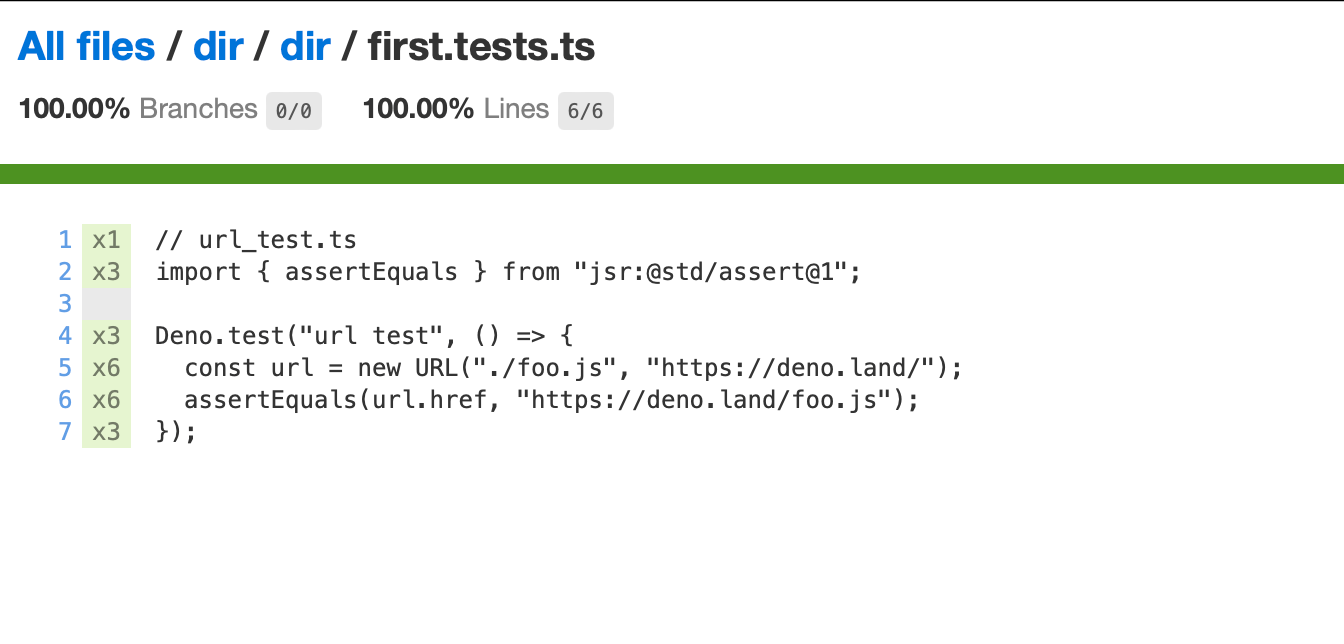
deno testgets a new--hide-stacktracesflag that will disable printing of error stack traces on test failures--allow-noneflag indeno testhas been renamed to--permit-no-files. We intend to deprecate the old flag in Deno 2, so if you rely on it, make sure to update your scripts!
Simpler frozen lockfile
Frozen lockfile, introduced in Deno v1.46, is a simple and convenient way to ensure Deno errors when a new dependency is being added to the lockfile.
This release makes it easier to ensure everyone on your project uses this option by specifying the following in your config file:
{
  "lock": {
    "frozen": true
  }
}
Any time a dependency is updated that will change the lockfile, Deno will throw
an error asking you to explicitly pass --frozen=false flag, making adding
dependencies a conscious decision on your end.
Additionally, to save bandwidth and time needed to inspect git diffs, the
lockfile format will become more concise in Deno 2.
You can try it today by using the
DENO_FUTURE=1 env
var. Note, however, that switching back to not using DENO_FUTURE will require
regenerating the lockfile.
File watcher
Hot Module Replacement, added in Deno v1.38,
is now considered stable under the --watch-hmr flag. It will show up next to
the --watch flag in the help output for relevant subcommands.
Additionally deno test got support for the --watch=<PATHS> flag, which
allows you to pass additional file paths to be watched for changes and trigger a
test re-run.
Web APIs
Deno v1.46 brings two noticeable additions to the Web APIs:
AsyncIterable<T>can now be used to construct body forRequestandResponseclasses. For example,createReadStreamfromnode:fsis an API that implementsAsyncIterableprotocol, so it can be used withfetchAPI like so:
const file = createReadStream("./fixture.json");

const response = await fetch("http://example.com", {
  method: "POST",
  body: file,
});
Deno will now stream the data as it becomes available (is read from disk) for efficient HTTP calls.
URLPatternAPI now supportignoreCaseandhasRegExpGroups. The former allows for case-insensitive pattern matching:
const pattern = new URLPattern({
  pathname: "/foo/bar",
}, {
  ignoreCase: true,
});
pattern.test("/foo/bar"); // true
pattern.test("/fOo/BaR"); // true
The hasRegExpGroups property lets you know if the pattern uses any regexp
groups:
const pattern = new URLPattern({
  pathname: "/foo/bar/(.+)",
});
pattern.hasRegExpGroups; // true
The Standard Library is stable
The Deno Standard Library offers a set of high quality packages ranging from data parsing and manipulation, working with web protocols, and general utilities that are audited by the core team and guaranteed to work with Deno.
We are thrilled to announce that we have completed our stabilization process, with 30 packages at v1 or greater.
- std/assert
- std/async
- std/bytes
- std/cli
- std/collections
- std/crypto
- std/csv
- std/data-structures
- std/encoding
- std/expect
- std/fmt
- std/front-matter
- std/fs
- std/html
- std/http
- std/json
- std/jsonc
- std/media-types
- std/msgpack
- std/net
- std/path
- std/regexp
- std/semver
- std/streams
- std/testing
- std/text
- std/toml
- std/ulid
- std/uuid
- std/yaml
To share what can be done using modules in the Standard Library, we’ve published a tweet thread with a code example of each module per tweet.
If you’d like to learn more about our Standard Library, check out our short 3 minute video:
V8 12.9
Deno 1.46 ships with the latest V8 12.9.
Acknowledgments
We couldn’t build Deno without the help of our community! Whether by answering questions in our community Discord server or reporting bugs, we are incredibly grateful for your support. In particular, we’d like to thank the following people for their contributions to Deno 1.46: Andreas Deininger, Bedis Nbiba, Birk Skyum, Hajime-san, HasanAlrimawi, Ian Bull, Igor Borisoglebski, Ivancing, Kenta Moriuchi, Kyle Kelley, MrEconomical, MujahedSafaa, Pig Fang, Rano | Ranadeep, Roy Ivy III, Sean McArthur, Yazan AbdAl-Rahman, Zebreus, chirsz, i-api, melbourne2991, seb, vwh, and Łukasz Czerniawski.
Would you like to join the ranks of Deno contributors? Check out our contribution docs here, and we’ll see you on the list next time.
Believe it or not, the changes listed above still don’t tell you everything that got better in 1.46. You can view the full list of pull requests merged in Deno 1.46 on GitHub here.
Thank you for catching up with our 1.46 release, and we hope you love building with Deno!
What’s next?
🚨️ Deno 2 is right around the corner 🚨️
In a few days the first “Release Candidate” of Deno 2 will be released.
There are some minor breaking changes in Deno 2.
You’ll be able to get it using deno upgrade rc, but you can already future
proof your code by adding the
DENO_FUTURE=1 env var
today.